AI-Powered Call
Center Intelligence
Project Overview
An enterprise AI intelligence platform that brings real-time transcription, sentiment analysis, and automated scoring to every call. As Lead Product Designer, I designed the complete experience — from the AI-powered analytics dashboard to individual call intelligence views — giving managers instant AI-driven insights across 100,000+ daily interactions without listening to a single recording.
This case study demonstrates my approach to designing AI-powered intelligence platforms — where the challenge isn't just surfacing AI data, but making transcription, sentiment, and scoring insights instantly actionable through thoughtful information architecture and progressive disclosure.
The Problem
Enterprise contact centers lacked any AI intelligence layer — creating critical visibility gaps:
Managers had no way to understand what was actually happening on calls — no transcriptions, no summaries, no sentiment data. Insights were locked inside audio files nobody had time to replay.
Existing tools captured call recordings but offered no intelligence on top. No auto-transcription, no sentiment detection, no AI-generated summaries — just raw audio and manual notes.
Agent performance metrics lived across 5+ disconnected tools — CRM, call recorder, spreadsheets, coaching notes. No single dashboard tied it all together.
Customer frustration, hesitation, and urgency went completely undetected until escalation. There was no real-time or post-call sentiment analysis to flag at-risk conversations.
Supervisors coached agents based on gut feeling and anecdotal feedback. No AI scoring, no talk/listen ratios, no conversation pattern analysis to back up coaching decisions.
Phase 1: Research & Discovery (3 weeks)
I followed a research-driven, iterative design process spanning 4 months. The focus: understanding how managers currently extract insights from calls without AI, and designing an intelligence layer that surfaces transcription, sentiment, and scoring data where they need it most.
Stakeholder Interviews
Teams wanted AI transcription that works in real-time — not batch processing hours after calls ended
Sentiment detection was the #1 requested feature — managers needed to spot frustrated customers without listening to every call
Auto-generated call summaries would save 60% of the time spent on post-call documentation and note-taking
Biggest need: a unified AI dashboard that surfaces insights automatically, not another tool that requires manual digging

Workflow Observation
I shadowed 3 quality managers for full workdays, observing their actual review process. This revealed critical insights that interviews missed:
Supervisors toggled between call recorder → CRM → spreadsheet → coaching notes — no single AI-powered view existed
They manually transcribed key moments from calls into documents — a process AI transcription could eliminate entirely
Talk/listen ratios, sentiment shifts, and conversation patterns were all tracked mentally — zero data-driven intelligence
Competitive Analysis
I analyzed 6 competing platforms (Gong, Chorus.ai, CallMiner, Observe.AI, Balto, Talkdesk) identifying:
Gap: Tools like Gong and Chorus.ai focused on sales calls. No platform offered AI intelligence tailored to support center operations with compliance and sentiment tracking
Opportunity: Real-time AI transcription + automatic sentiment analysis + configurable AI scoring in one dashboard — no competitor combined all three
UX Pattern: Competing dashboards showed 15+ raw metrics without AI prioritization — data overload without intelligence
Phase 2: Information Architecture (2 weeks)
I conducted card sorting sessions with 6 managers to understand how they mentally organize AI intelligence data. Participants grouped 40 different AI metrics into categories. Result: Three consistent groupings emerged: (1) AI sentiment & emotion data, (2) AI scoring & performance metrics, (3) Conversation intelligence (transcription, talk/listen, key moments).
Progressive Disclosure Strategy
The core design challenge: surface AI transcription, sentiment, and scoring insights without overwhelming users. I designed a three-layer intelligence architecture:
✓This approach tested extremely well — users could complete tasks 60% faster than with traditional all-at-once dashboards, and reported 75% less cognitive overwhelm.
Phase 3: Wireframing & Prototyping (3 weeks)
Low-Fidelity Wireframes
I started with paper sketches exploring different layouts for the AI intelligence dashboard. Key explorations:
Layout A: Horizontal metrics bar at top → large chart below → call list at bottom
Layout B: Left sidebar with metrics → chart + call list in main area (selected)
Layout C: Grid of metric cards → expandable chart sections
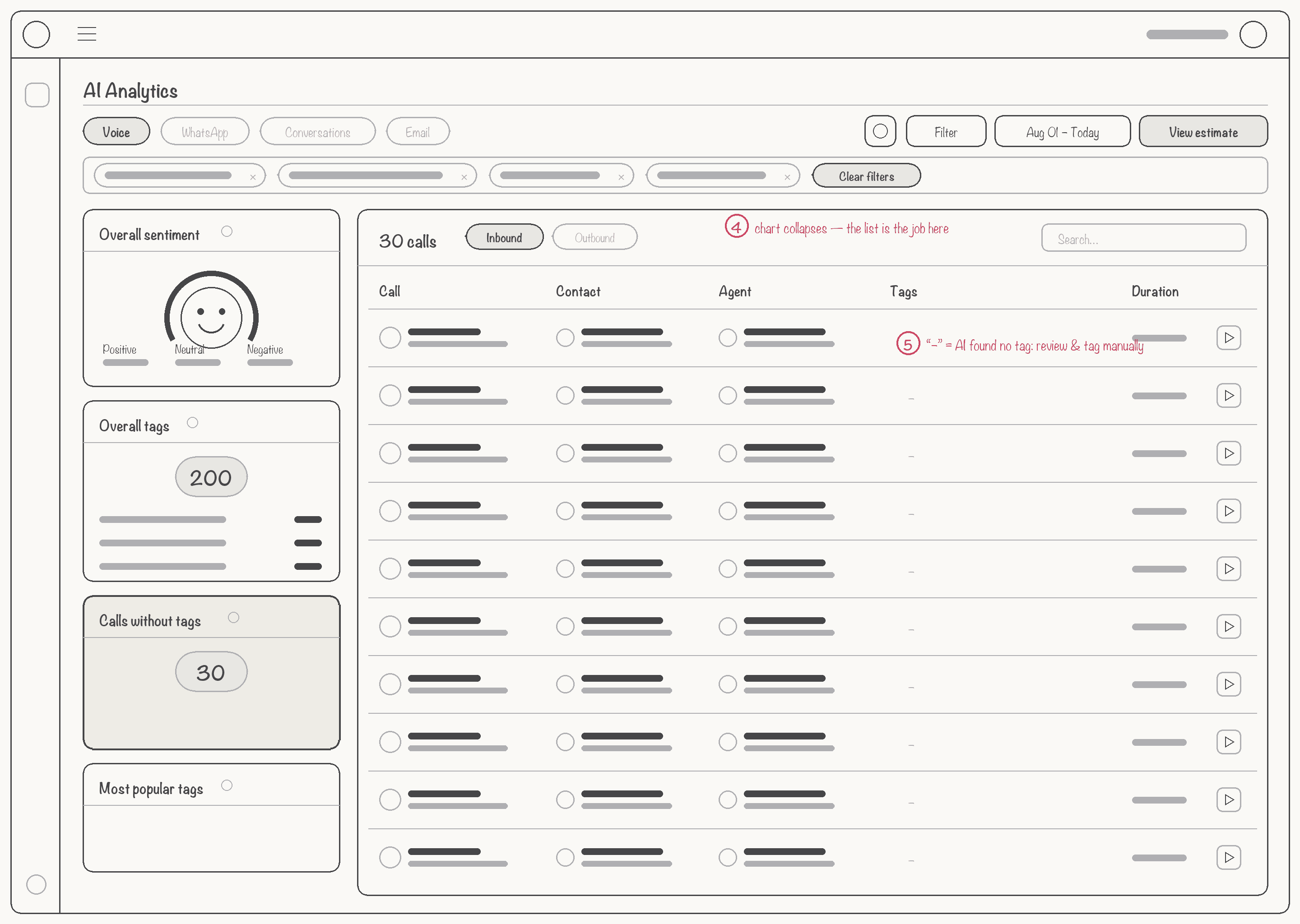
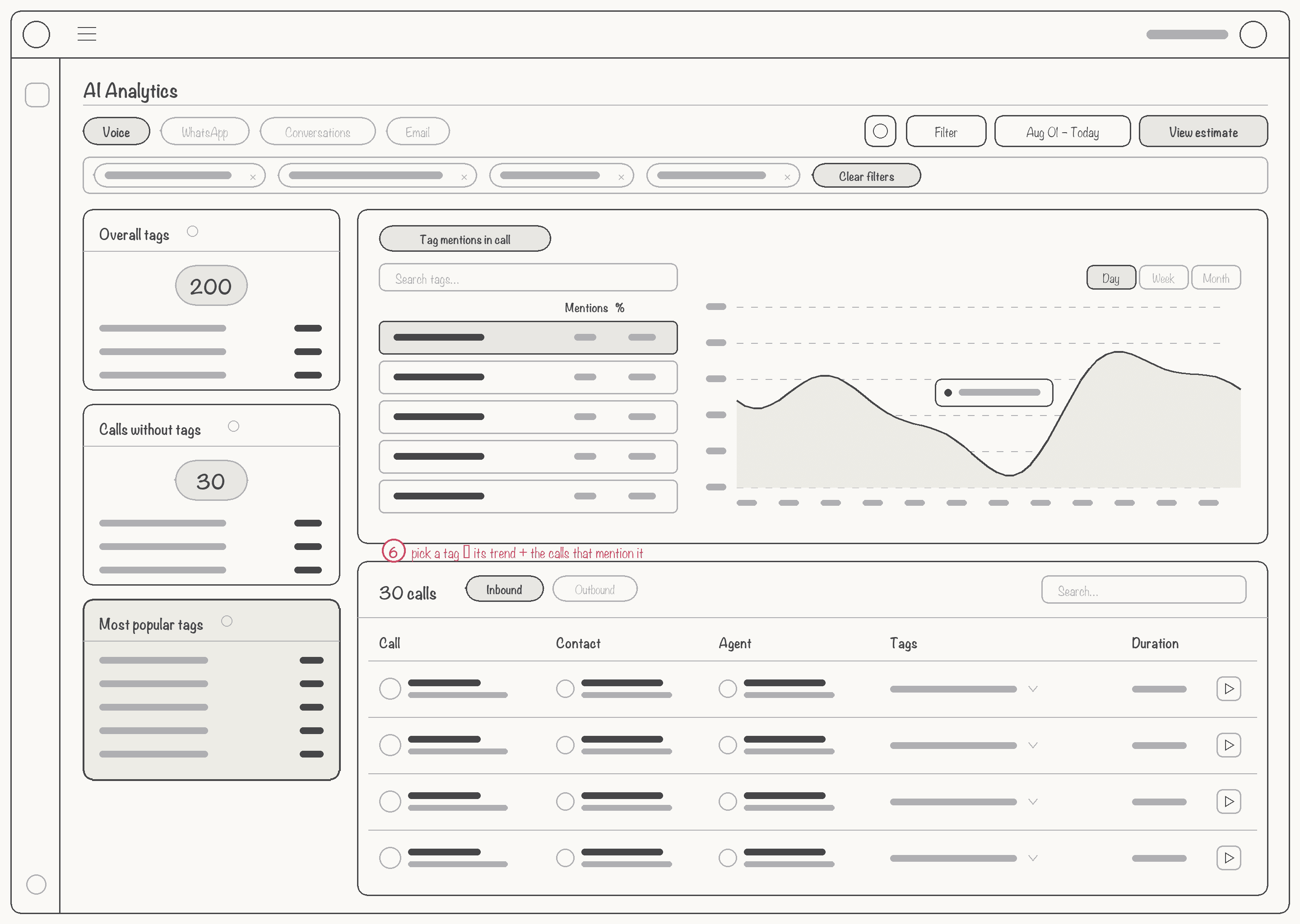
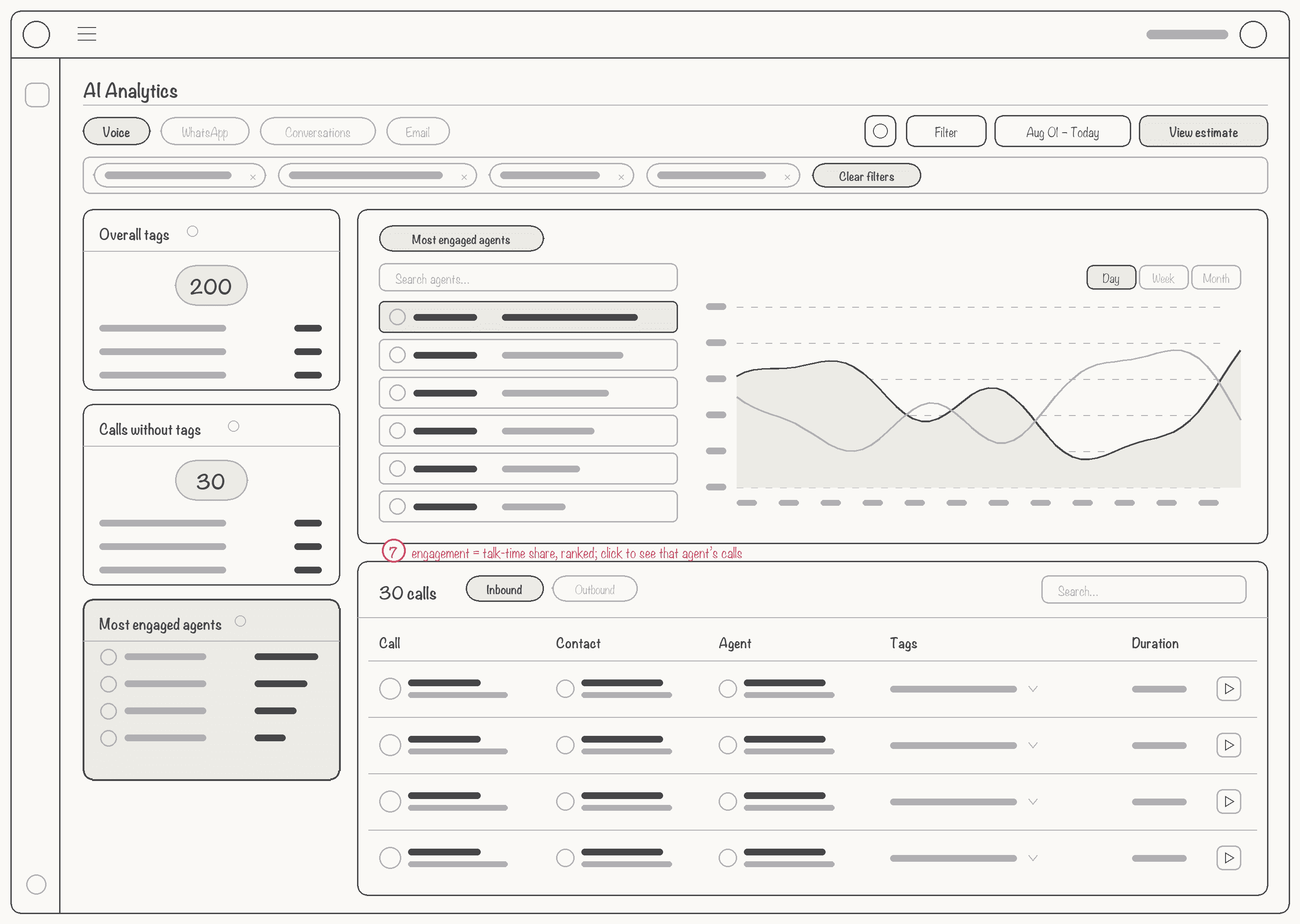
Layout B won testing because the left sidebar kept AI sentiment and scoring metrics visible while users explored the call list. This matched the natural workflow of monitoring AI intelligence while drilling into individual call transcriptions.
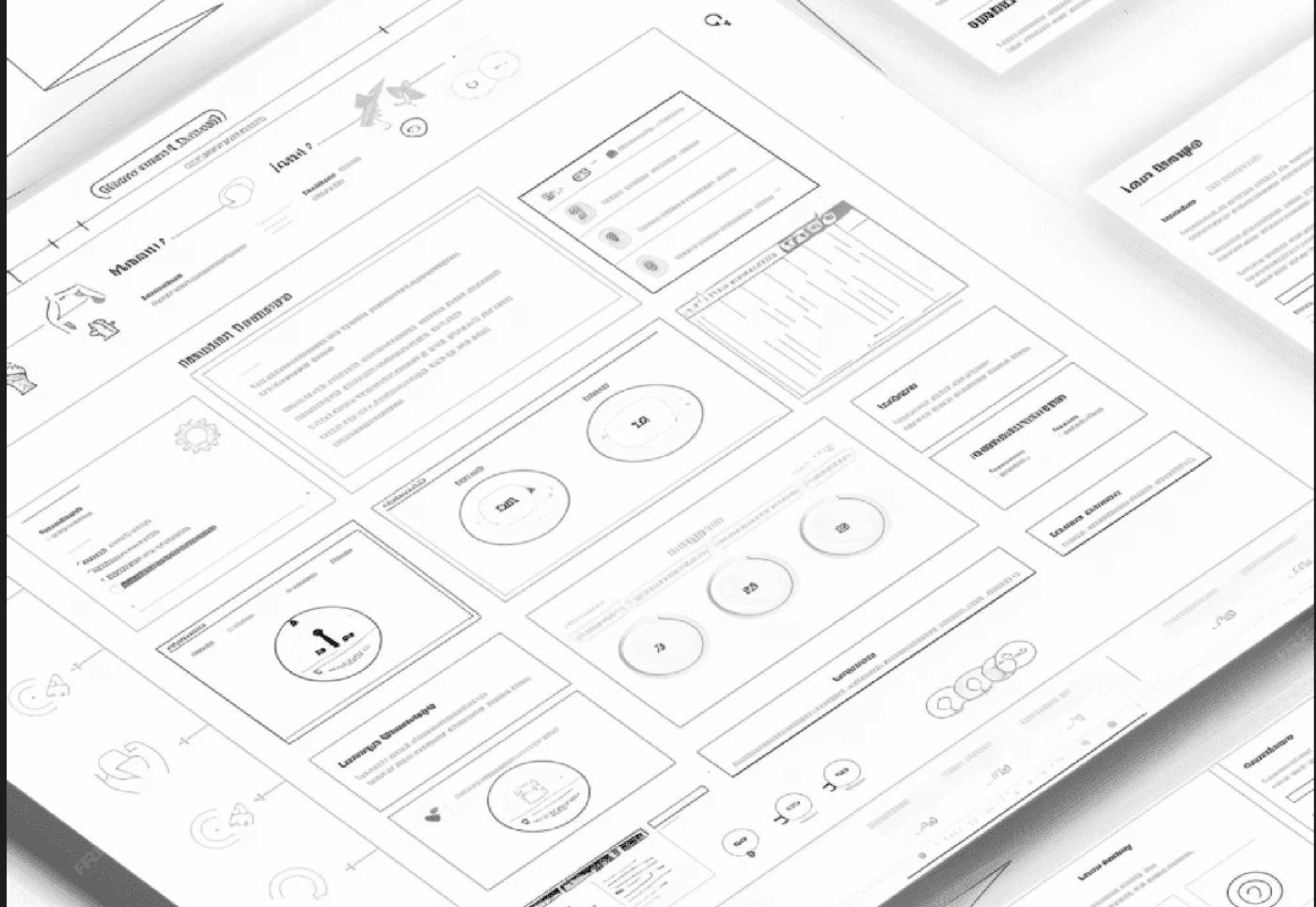
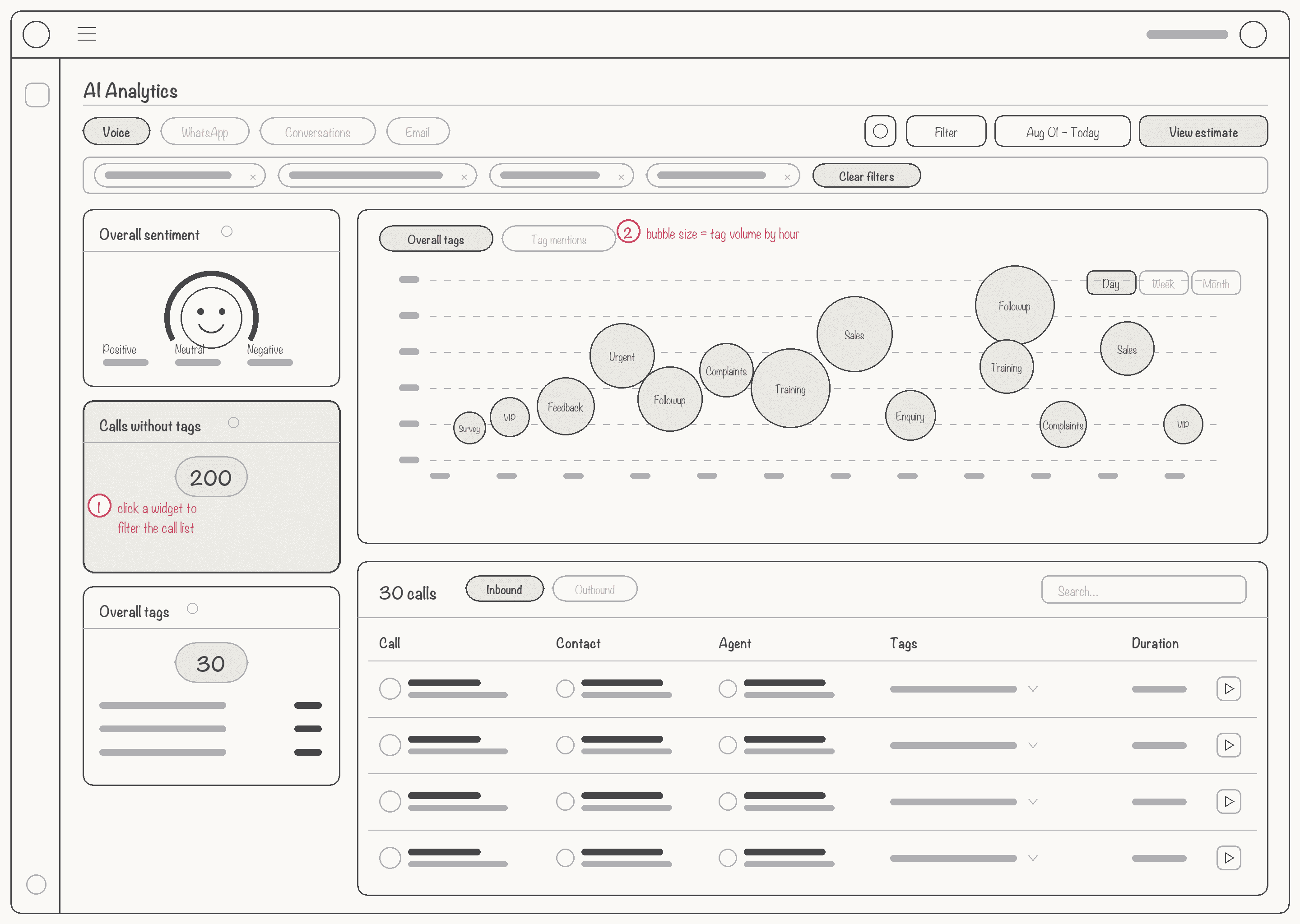
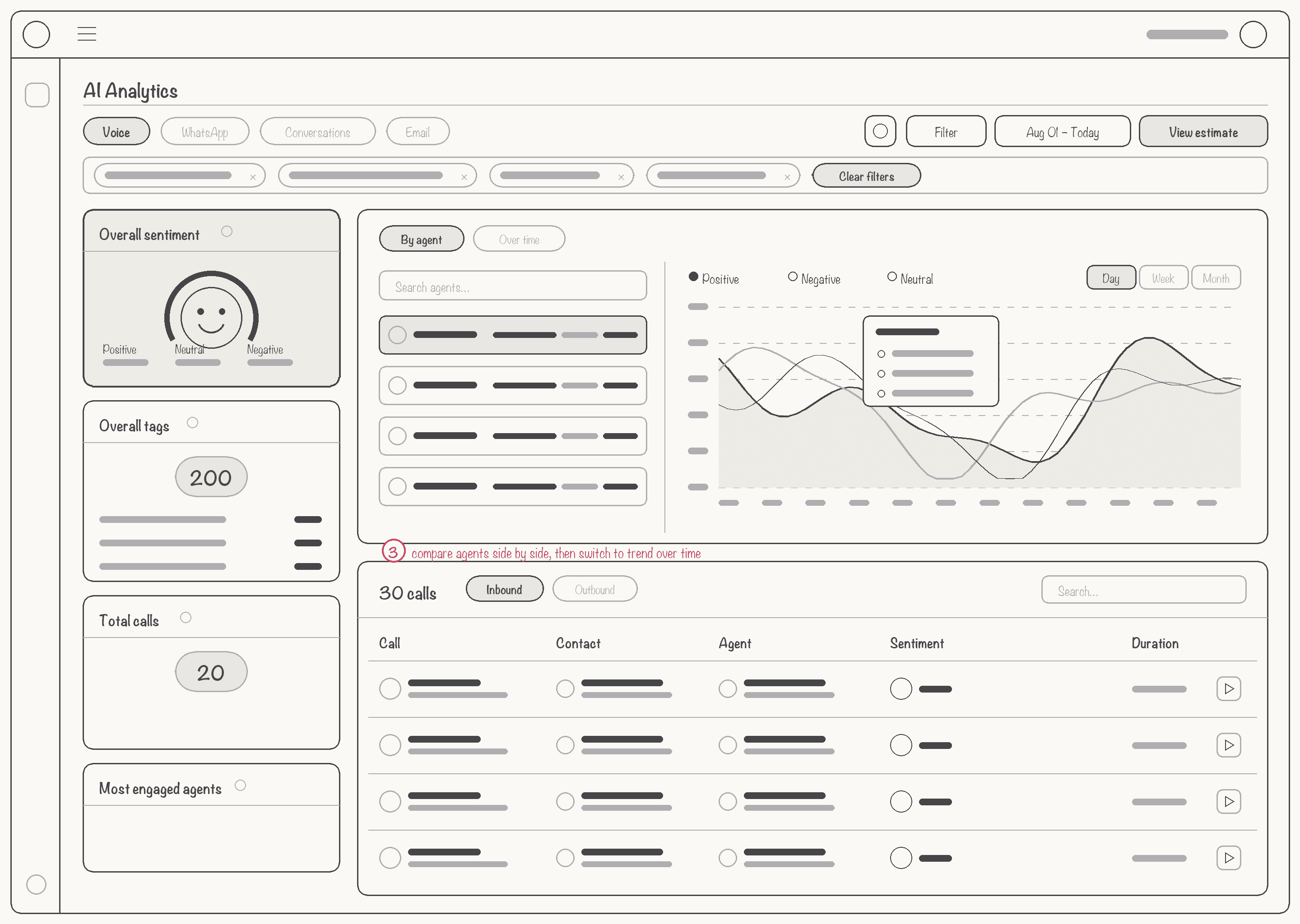
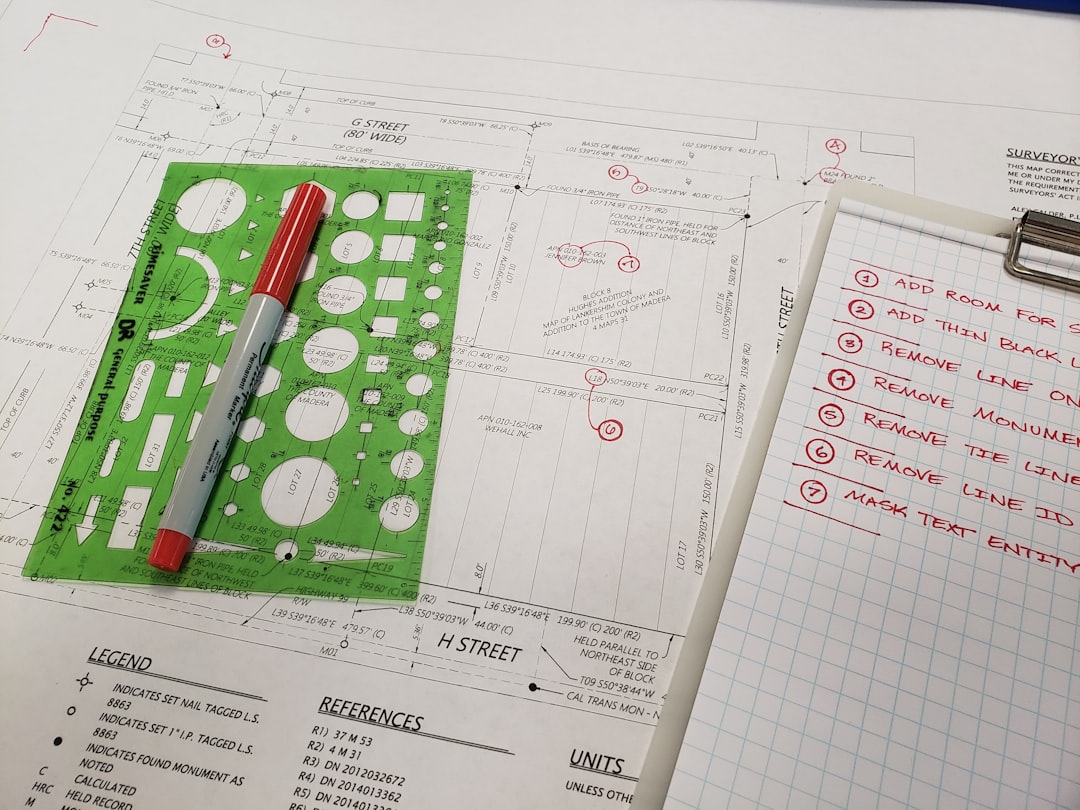
Before any visual design I sketched each view of the dashboard on the same frame: widgets on the left, the chart that answers the current question top-right, and the call list that proves it underneath. Keeping the frame fixed meant managers only ever had to learn one screen.
Interactive Prototype Testing
Created medium-fidelity Figma prototypes of the AI intelligence dashboard and tested with 8 managers across 3 enterprise clients.
Users expected clicking the sentiment gauge to filter calls by emotion. Solution: Made every AI metric interactive — clicking any data point filters the call list instantly
AI transcription needed to be scannable, not a wall of text. Solution: Added speaker labels, timestamps, and AI-highlighted key moments within transcripts
Users wanted AI summaries front and center, not buried in detail views. Solution: Surfaced one-line AI summary in the call list itself, expandable on click
Supervisors needed to export AI insights for coaching. Solution: Added one-click export of AI scores, sentiment data, and transcripts as CSV/PDF
Phase 4: Visual Design & Design System (4 weeks)
Design System for AI Interfaces
I built a 150+ component design system from scratch, optimized for AI-dense data interfaces — sentiment gauges, transcription views, scoring cards, and intelligence widgets.
Components: Metric cards, sentiment gauges, data tables, line charts, filters, badges, loading states (150+ total)
Documentation: Interaction states, responsive behavior, accessibility requirements, edge cases, code snippets
Color System: Semantic colors (green=positive, red=alert, purple=neutral, blue=interactive) + accessibility-tested contrast ratios
Impact: 50% reduction in developer questions, consistent UI across platform, reused for all features
Prioritize Glanceability: Large numbers, color-coded indicators, trend arrows — users should understand status in <3 seconds
Semantic Color: Green = good/passing, Red = needs attention, Purple = neutral metrics, Blue = interactive elements
Context Over Precision: Show “passing score: 80%” not “79.847%” — precision creates false confidence
Make Everything Clickable: Every data point becomes an entry point for investigation
Final Solution
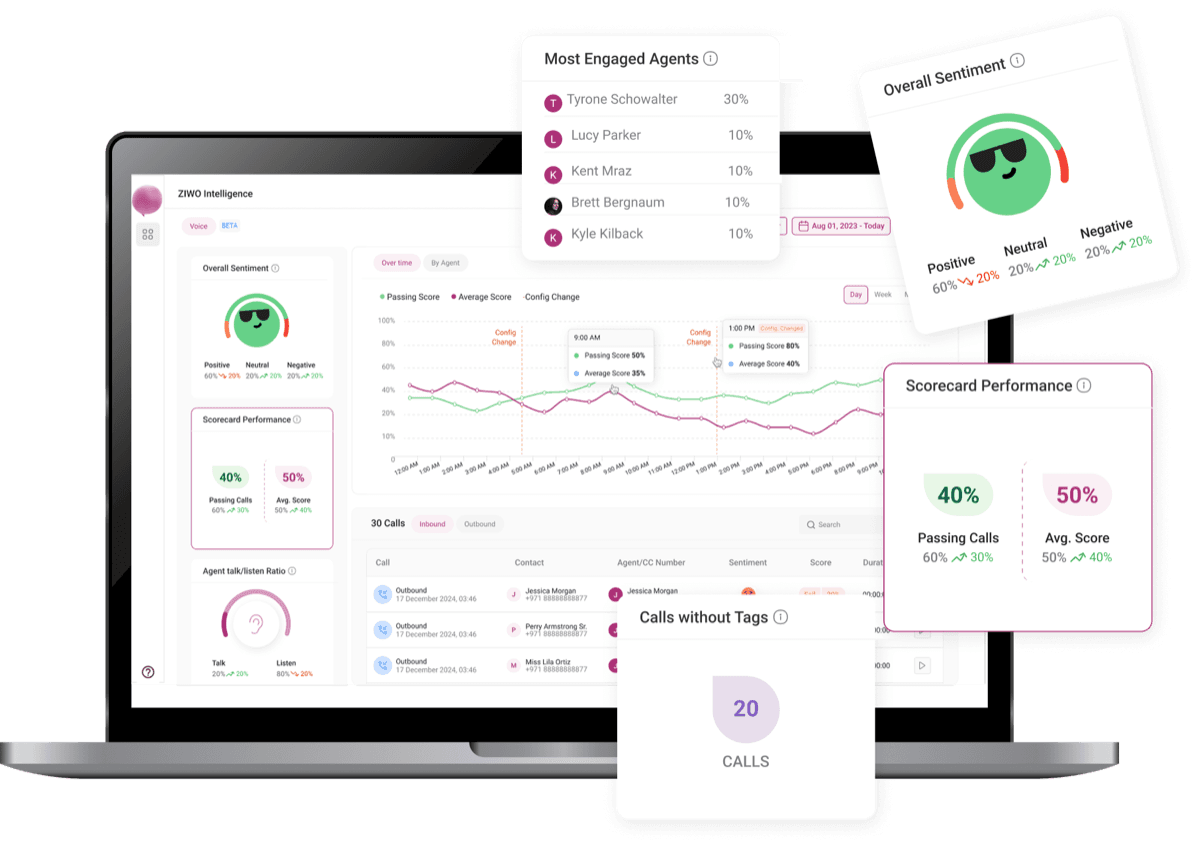
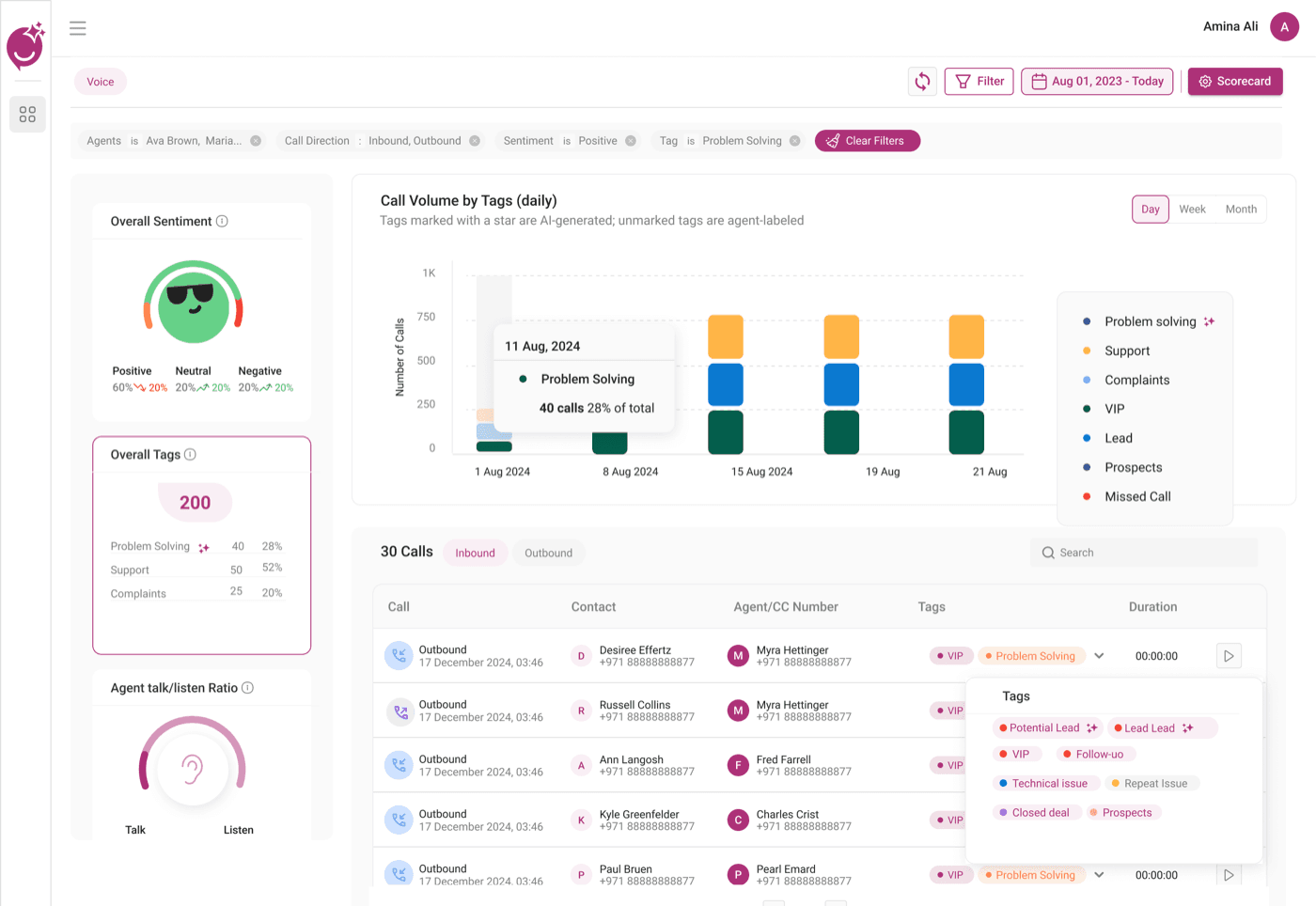
The AI intelligence dashboard surfaces transcription, sentiment, scoring, and conversation analytics through five interconnected modules — each powered by AI, each interactive, each designed for instant comprehension.
AI Sentiment Analysis
Real-time sentiment detection powered by NLP. The circular gauge visualizes positive/negative/neutral ratios with trend arrows. Emoji-based indicators make emotional context instantly readable. Every element is clickable to drill into filtered call lists.
AI Call Scoring
Automatic scoring of every call against configurable AI benchmarks. Dual metrics show passing rate and average score with color-coded thresholds. Comparison values surface whether current AI scores are trending up or down vs. historical baselines.
Performance Intelligence
AI-powered trend analysis across time. Dual-line charts track AI score and passing rate over days/weeks/months. Vertical markers flag configuration changes, helping teams correlate AI model updates with performance shifts.
Talk/Listen Intelligence
AI-analyzed conversation balance. Circular gauge shows agent talk vs. listen ratio, identifying agents who dominate conversations or fail to engage. Conversation pattern analysis surfaces coaching opportunities automatically.
AI-Enriched Call List
Every call enriched with AI-generated sentiment badge, auto-score, transcription status, and one-line AI summary. Clicking any call opens the full AI analysis — transcription, sentiment timeline, scorecard, and AI-generated action items.
AI Scorecard Dashboard
The central intelligence hub — combining real-time sentiment analysis, scorecard performance tracking, agent talk/listen ratios, and a live call feed into a single unified view.
Call Details View
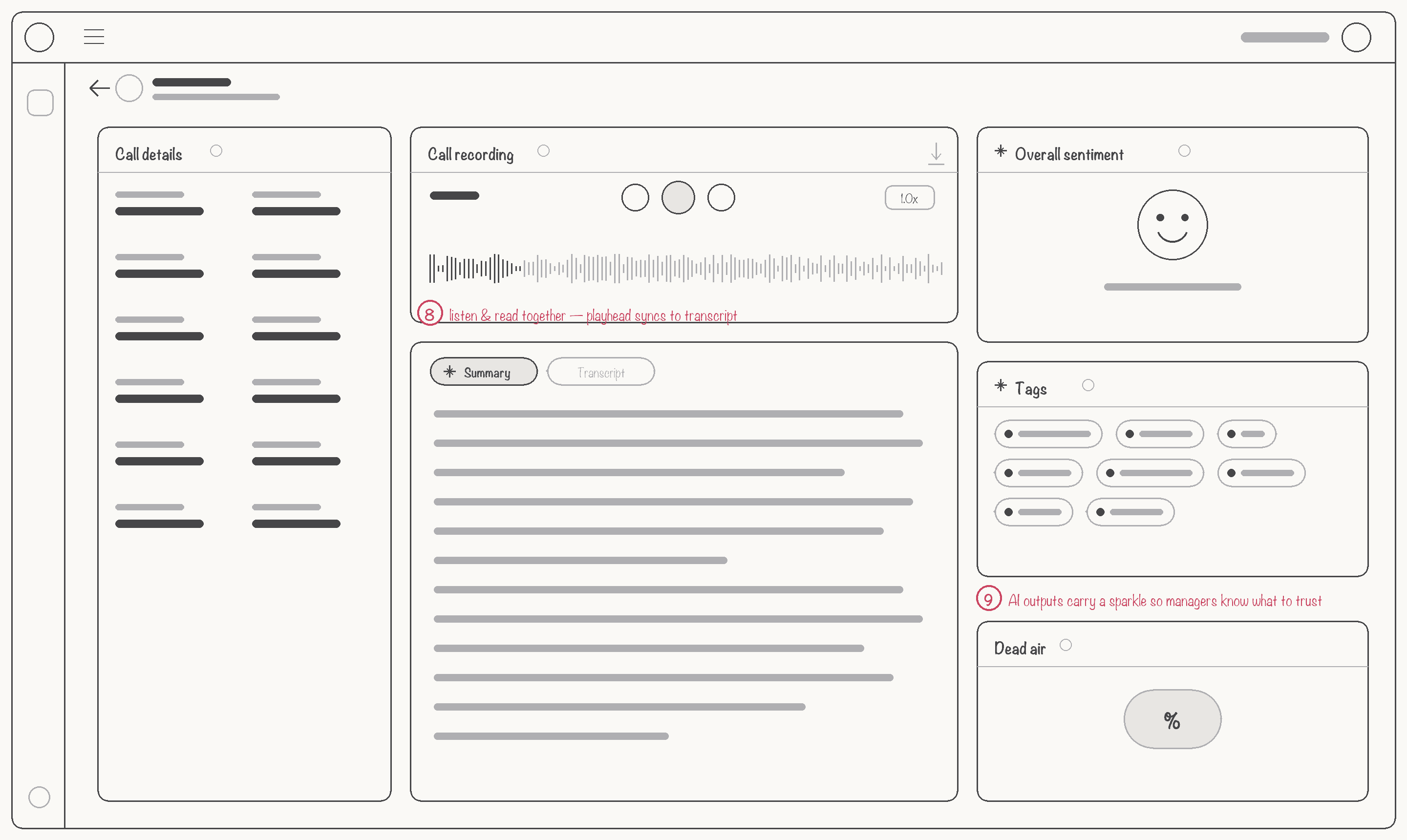
Full AI analysis for any individual call — real-time transcription with speaker labels, AI-generated summary and key moments, automated scorecard, and sentiment timeline visualization.
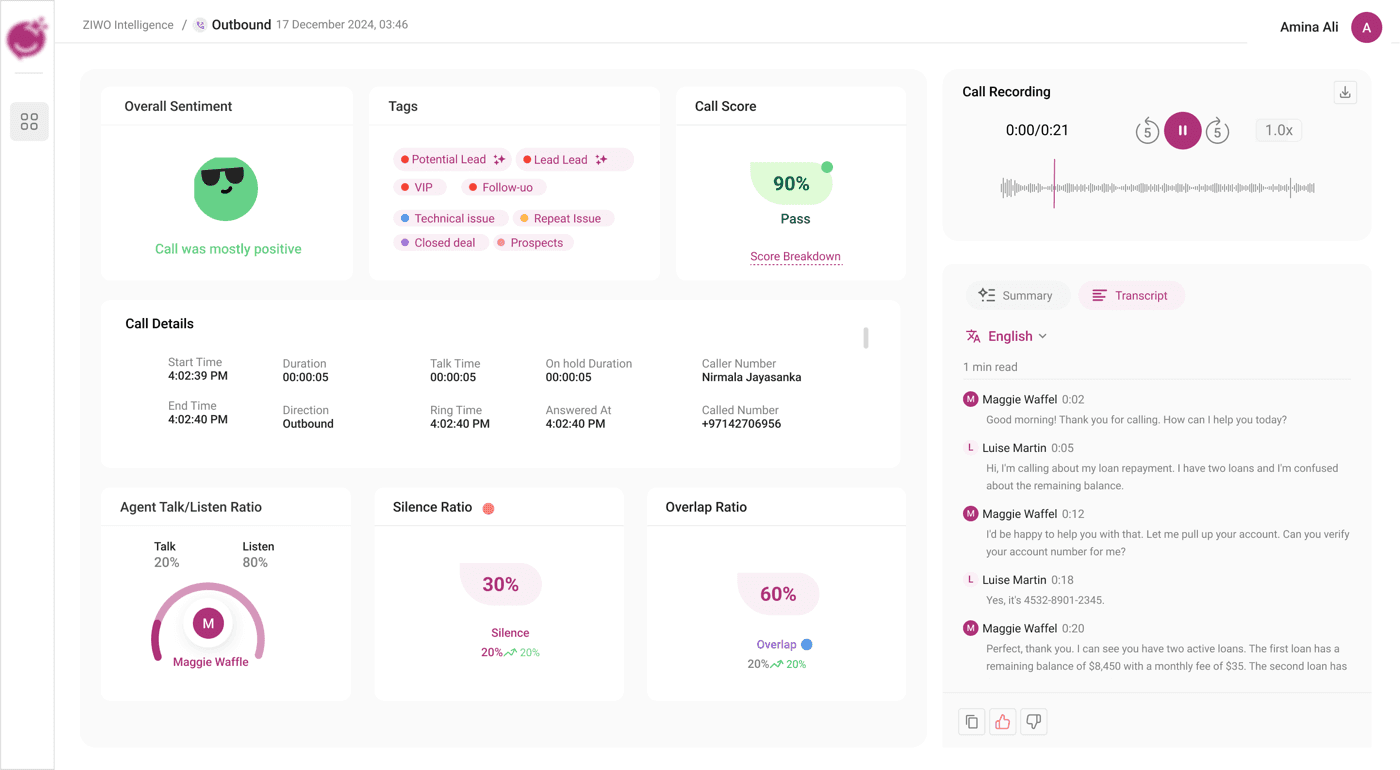
AI-powered call transcription with speaker labels
AI-generated call summary & key moments
Automated scorecard with AI benchmarks
Real-time sentiment timeline visualization
AI-Generated Call
Summary
Every call is automatically transcribed and summarized by AI in both English and Arabic. The system generates intelligent call summaries with key topics, action items, and sentiment — enabling managers across the MENA region to review conversations instantly without replaying audio, regardless of the language spoken.
Real-time speech-to-text in English and Arabic with 95%+ accuracy, automatic language detection, and speaker diarization for every call.
One-click summaries in both languages extract key topics, action items, and customer sentiment — eliminating manual note-taking across multilingual teams.
Seamless switching between English and Arabic transcripts with synchronized timestamps, allowing supervisors to review calls in their preferred language.
Waveform visualization with playback controls, 5-second skip, and speed adjustment synced to the transcript in the selected language.
Supporting English and Arabic was critical for MENA market adoption. We prioritized bilingual AI summaries so that supervisors could review any call in their preferred language — reducing the barrier to insight and enabling cross-language quality monitoring at scale.

Results & Impact
AI transcription + auto-summaries reduced time-to-insight from hours of manual listening to seconds
Every call now has AI transcription, sentiment analysis, and automated scoring — not just the 2–5% sampled manually
AI-driven coaching insights improved agent scores through data-backed, personalized feedback loops
Business Impact
AI transcription eliminated manual note-taking — every call is automatically transcribed with 95%+ accuracy
Sentiment analysis surfaces at-risk conversations in real-time, reducing escalations by flagging frustration early
AI scoring replaced subjective reviews with consistent, configurable benchmarks across all enterprise clients
Conversation intelligence (talk/listen ratios, key moment detection) enabled data-driven agent coaching at scale
Unified AI dashboard consolidated 5+ fragmented tools into a single intelligence platform
"The AI intelligence dashboard changed everything. We went from listening to random calls to having AI transcription, sentiment, and scoring on every single interaction — insights we never had before."
Key Learnings
AI Intelligence Must Be Surfaced, Not Buried
Users don’t want to hunt for AI insights. Auto-generated summaries, sentiment badges, and AI scores must be visible at the list level — not hidden behind clicks. The progressive disclosure model (Dashboard → Segment → Call Detail) reduced cognitive load by 75%.
Make Every AI Metric Interactive
Users instinctively clicked sentiment percentages and AI scores expecting to filter. Converting every AI data point into an interactive filter transformed the dashboard from a passive report into an active exploration tool.
Context Over Precision in AI Scoring
Managers preferred “AI score: 80% (vs. 75% avg)” over “79.847%.” Comparative context from the AI helped them understand significance. Precision without context creates false confidence.
Design Systems Accelerate AI Product Delivery
Building 150+ components for data-dense AI interfaces upfront reduced developer questions by 50% and enabled consistent UI across 8+ features — sentiment gauges, transcript views, scoring cards all reusable.